Did you try to remove the TPM ship and check if it is still shorting 20 mA constant ? I don’t want to mess with the TPM ship yet, just checking if you have attempted or not ?
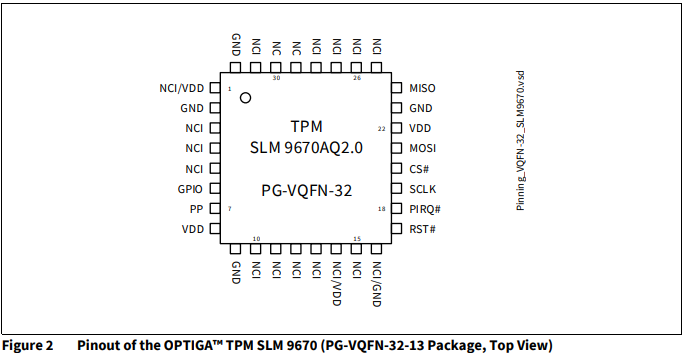
I would swap the TPM chip for testing and check if it makes a difference.
Thanks for the info Calvin, I’ll try to trace them. On the other hand I’m on SB so if one has a problem it would rather be the SSD controller. Or worse the TPM. And no I haven’t touched the TPM, I don’t think it’s guilty, I have 2 at once with the same problem and I’m not the only one and as you say that the chip is not “exchangeable”, I prefer not to do anything for the moment. I’ll look into it over the weekend and keep you informed.
I was curious about if it might be a nor ship (bios) problem and I found the nor dump to be corrupted, it is all FF for
0x001C7200 Mainboard S/N ( there is value but make no sense )
0x001C7210 Console S/N
0x001C7230 X Model No
0x001C7250 S/N
0x001C73C0 WiFi MACs
Can you have a look at your nor file ? Do you also have a working dump file for CFI-2016 EDM-040 SB 69GG, SSD SB 70GG and wifi ship AK8M20DAL1 ? Thanks
Hi, I have something but I don’t know how to put it here.
Hi, I did some tests with the different BIOSes I had, and one allowed me to go up to 200 mA, so I think that’s where the problem lies. However, I’m not a BIOS expert. Is there data that needs to be recovered from the original BIOS to put into the new BIOS? Thanks.
While waiting for your answers, I’ll continue looking for other BIOS to see if one works correctly. 
I’m neither a bios expert but after looking around, I believe the one I mentioned earlier are the one needed:
Motherboard ID can be found on the board
Case ID can be found on the case
Model no CFI-2016 xxx the xxx I don’t know and not sure how important
S/N no idea where to get or how important
Wifi mac, you can read on the wifi ship and than replicate it for 3 time (Wifi mac - wifi mac +1 - wifi mac +2)
That is what I know
Here is a photo of my 2 bios with the initial failure (on the left) and the bios which works up to 200 mA and what I get as a uart error code
Uploading: Capture d’écran 2025-10-04 110456.png…
Uploading: Capture d’écran 2025-10-04 112512.png…
I can’t find the console serial number on the card if anyone has a picture..
Well, I’m starting to understand a little how a bios works. So in my broken console bios, only one line remains correct, the serial number of the card, everything else is nonsense. So I can put the chassis number back without any problem. On the other hand, for the CFI 2016, there is only that on the case, so you will have to choose the end. On the other hand, for the mac address, then it’s Chinese for me ^^ I can’t find any correspondence with the wifi module. If anyone knows how it works, I’m interested
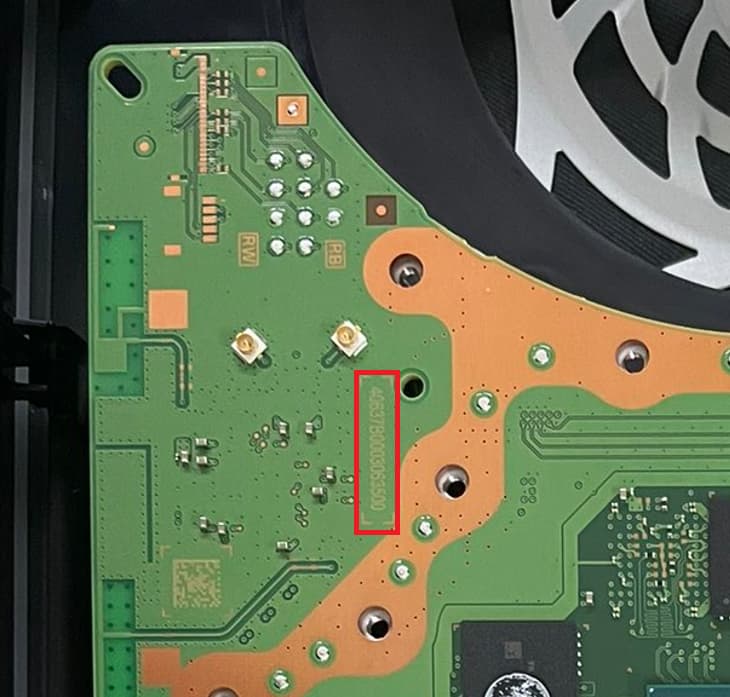
The serial number is written near the both wifi antenna connectors.
But in the first place it shouldn’t matter, what S/N numbers and MACs are written in the NOR dump as long the donor NOR dump is not corrupted and match the setup of components.
A donor NOR dump should work without adjusted serial numbers, macs,…
Thanks Calvin, so how do I know if I have the right configuration? I assume there are mandatory hardware correspondences. If so, which ones and on which lines? Thanks in advance
I’m running into the same issue as you. By any chance have you measured the capacitor readings to ground under the ssd controller? Im getting a few that are 50ohms which doesn’t seem normal to me. Can you check if you have the same thing? And whoever has a working edm 040 board, can you confirm this please?
Hi, I’d like to take a measurement, but I’d need to know which capacitor. For that, post a photo showing it. That said, many capacitors have low impedance in this area, such as under the CPU. It doesn’t seem inconsistent to me.
Hello Calvin, I have 0.006 on pin 18, I have removed the RT126 and it is still the same. where do I look next, My boars is a EDM-20 and no beep no light is the issue.
Hello, the best approach would be to inject 1V onto pin 18 with a bench power supply and observe the current draw. Then, locate the hot spot with a thermal imaging camera.
Hello Guys, i have a PS5 with the same failure, i want to help to fix it, if you need someting from my side like to download the BIOS and validate the console values i can do it, also i can take voltages from the failure board an compare vs a good one
Bonjour je pense qu’il et possible que sa vienne du contrôleur ssd car beaucoup de panne de ps5 qui crach en jeux ou qui alume 2 ou 1 second et s’éteint et problème wifi et bien d’autres car se contrôleur contrôle beaucoup de choses si c’est pas tous pour validation il et les yeux et la bouche de l’apu selon la partie interne du contrôle qui et endommagé il génère un code différent pour indiqué ou et la panne mais à l’heure actuelle beaucoup de code ne sont pas identifiés et certaines personnes qui l’ont identifié ne partagent pas.
Et en même temps j’ai u une ps5 qui avait plus de numéro de série ni de modèle et elle fonctionné très bien