I’ve fixed a few ps5s but this is my first of these, and looking for some advice. Uart gave me 80c00136 and 80810001 codes. all fuses are good, no shorts found. It’s a CFI 1215A model. Console is getting 5v and 3.3. Just tried replacing the WiFi IC (my first BGA). Not sure if I need to try again with it, but I’m still getting the same codes. Any advice on where to go from here? Is there something else I should be checking on the board?
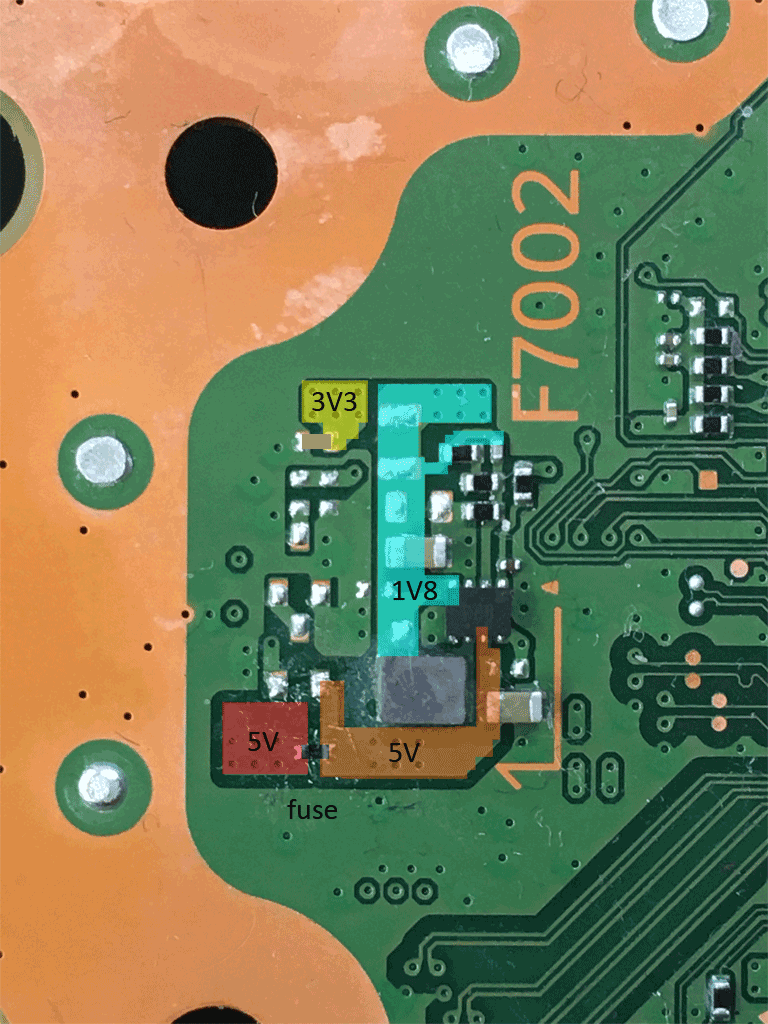
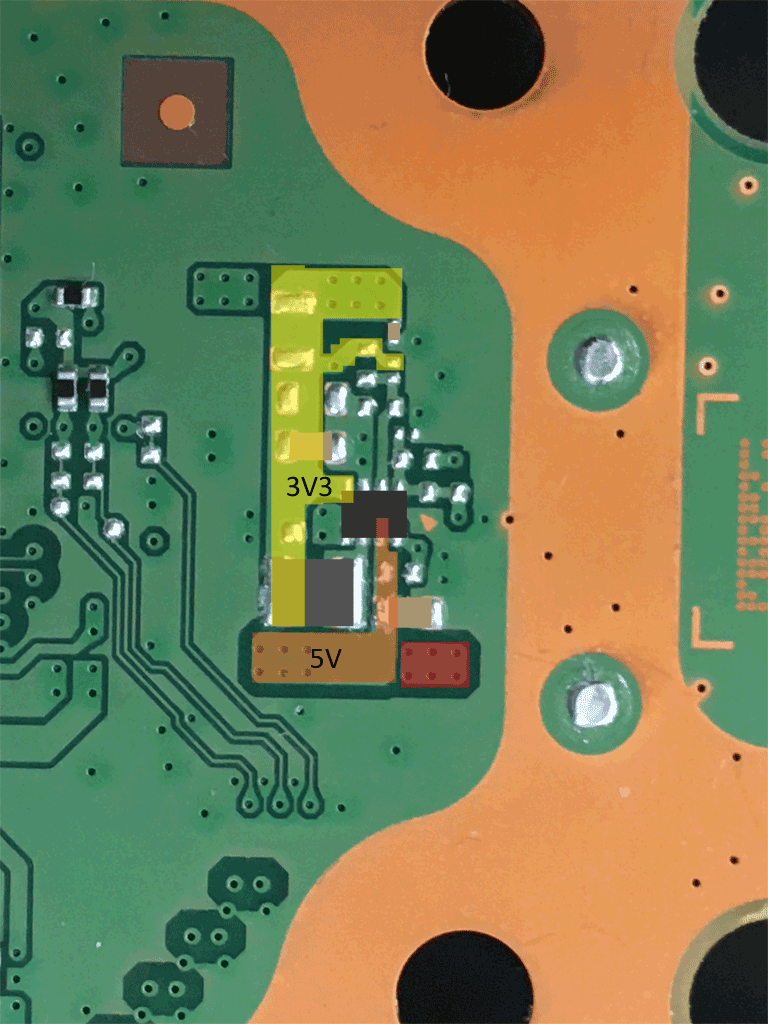
Thanks! I’m getting 3v3 and 5v, but not 1v8 on the first image. Haven’t had a chance to check the second section yet but I’ll look tomorrow. I’m starting to suspect the little a2 ic might be bad.
Please check the WiFi chip modell. There are different versions:
A - J20H100/AW-XM501 with two power rails 1.8V and 3.3V.
B - J20H104/AW-XM546 with only one power rail 3.3V
From my experience short at a power rail at the WiFi chip is in most cases a cap or the WiFi chip. A bad bug converter (a2 ic) I didn’t remember had them once defect.
It’s type b. So does that mean there wouldn’t be 1v8 at that location? To be clear, I haven’t actually found any shorted caps and I’ve already replaced the wifi chip with a like model.
I may give up on this guy. Pretty sure I just didn’t do a good job of putting in the replacement wifi IC. Unfortunately on my 2nd attempt I lost most of the conformal coating between the pads. I’m also now no longer able to get a beep, or any recognition of the southbridge in uart.
Oh no. 
The WiFi chip replacement isn’t the easiest job. It took me some attemps to get the replacement right in one go without separating the WiFi module or cooking the conformal coating.
Yeah. If I can figure out why the southbridge stopped responding I may try applying some up resin and giving it another go with a 2nd chip. Thanks for your help!
@Calvin if I decide to keep going down this rabbit hole, I figure the next step is to figure out why I’m no longer getting the southbridge to initialize (ie uart not getting error codes anymore). Assuming it’s not a simple short I missed on one of the WiFi ic pads, any suggestions on what to check next? I noticed when it was beeping that it was only very intermittently.
I you only replaced the WiFi chip and after that the southbridge isn’t responding anymore, I guess it will be some kind of shorting under the WiFi which causes the issue.
I already pulled the chip, but it’s possible I missed a bridge somewhere. I’ll have another look.
Was getting the same two 80810001 & 80C00136 errors after swapping out a few IC, Ending up swapping out the Wifi module and started working, thanks for this pic very helpful I also had to replace the 5v to 3.3v IC since it was missing 3.3v. Also AW-XM546 wifi
@Calvin my friend
EDM-033
Could you help me understand what voltages I should be getting for the AW-XM546?
I’m getting UART errors 80810001 and 80C00136, but I can’t find any shorts
Thanks!
If the board comes with an AW-XM546, the 1.8V rail shouldn’t be equipt with parts and the 3.3V rail should show 3.3V in standby.
A short at the 3.3V is a common issue for WiFi not starting/responding. But there are other ways the WiFi chip can fail without a short present.
If the 3.3V are present, I would assume that the WiFi module is the issue.
3.3V is present on all the capacitors under the WiFi module, and everything around the F7002 area also seems to match the expected readings.
However, in the area shown in the second photo you posted, my board has no components populated at all and no reading. Is this normal for a board equipped with the AW-XM546?
I can’t find any shorts anywhere.
One more question: if the AW-XM546 needs to be replaced, does it have to be replaced specifically with another AW-XM546, or can I use a J20H100 WiFi module from a donor board instead?
AW-XM546 and J20H104 have only one powerrail and so your board has only one populated WiFi power rail. The second WiFi powerrail would be populated if a AW-XM501/J20H100 is on board.
A - AW-XM546 and J20H104 are compatible.
B - AW-XM501 and J20H100 are compatible.
A and B are not (direct) compatible
In most case 3.3v would still present even there is a short(low reading), what is the actual diode or resistance reading on your 3.3v standby/wifi ?
In diode mode (red probe to ground), I’m getting a reading of 0.481 V.
What do you think?
thats good reading then
Could it be broken internally?