Hi everyone,
I’m having a very unusual issue with a PS5 Slim (EDM-040), and I’ve reached a point where I’m completely stuck with the diagnosis.
When I power on the console, it boots normally, loads the operating system without any issues, and everything appears to work as expected. However, after running for a while, the console suddenly freezes and then shuts off abruptly.
One interesting behavior is what happens afterward: if I try to turn it back on, pressing the power button produces the normal beep, but the console does not power on. Pressing the button a second time starts the console normally again, and the exact same sequence repeats in a loop.
Based on many posts I’ve read on this forum, I’ve already performed several tests:
-
Measured the resistance of the inductors.
-
Checked for possible shorts.
-
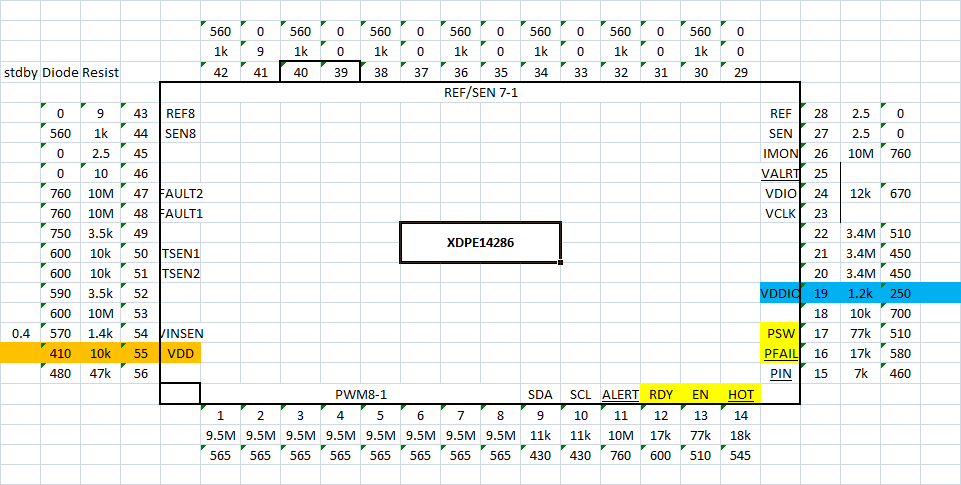
Verified that all the important voltage rails are present.
-
Inspected the board with a thermal camera looking for any component heating up abnormally.
Unfortunately, I don’t have much experience repairing PS5 consoles, so I’m having a hard time reaching a solid conclusion.
I did notice an interesting pattern: after multiple power-on attempts, the console tends to stay on slightly longer than during the previous attempt.
I should also mention that all of these tests were performed without the heatsink installed on the RAM side of the motherboard.
I also attempted twice to boot into Safe Mode and reinstall the system software. Surprisingly, both attempts were successful. These were performed at different times, not consecutively.
In both Safe Mode attempts I noticed another pattern: the console stayed powered on for a much longer time than usual. The second attempt lasted significantly longer than the first, although I suspect that’s because during the second attempt I installed the heatsink and added a couple of cooling fans to reduce the temperature on that side of the board.
During that second attempt, I was able to:
-
Complete the initial console setup.
-
Sign in and create a PlayStation account.
-
Start downloading Astro Bot from the PlayStation Store.
The console finally shut down abruptly when the download reached about 20%.
After ruling out a software issue, I checked the UART error log. I consistently get the same error codes every time:
[Slot #]	[Date Time]		[Error Code]	[Priority]		[Error Message]
00	19/07/26 2:05:05	808B00FF	Low		Known Unknown 808B00FF (Power) - Report Findings
|-(OK 00000000 808B00FF 000048E2 120000F6 10010000 2186 0036 FFFF 1BC6:6A)
Click for TSB Information

01	19/07/26 2:04:53	B0088108	Low		Known Unknown B0088108 (Chip or Data) - Report Findings
|-(OK 00000000 B0088108 000048D6 12000005 10010000 217B 0036 2EFB 1BC7:26)
Click for TSB Information

02	19/07/26 2:03:17	808B00FF	Low		Known Unknown 808B00FF (Power) - Report Findings
|-(OK 00000000 808B00FF 00004876 120000F6 10010000 2186 0036 FFFF 1C00:48)
Click for TSB Information

03	19/07/26 2:03:04	B0088108	Low		Known Unknown B0088108 (Chip or Data) - Report Findings
|-(OK 00000000 B0088108 00004869 12000005 10010000 217B 0036 2D59 1C00:E7)
Click for TSB Information

04	19/07/26 1:57:58	808B00FF	Low		Known Unknown 808B00FF (Power) - Report Findings
|-(OK 00000000 808B00FF 00004737 120000F6 10010000 2186 0036 FFFF 1C00:44)
Click for TSB Information

05	19/07/26 1:57:46	B0088108	Low		Known Unknown B0088108 (Chip or Data) - Report Findings
|-(OK 00000000 B0088108 0000472B 12000005 10010000 217B 0036 2D16 1C00:E4)
Click for TSB Information

06	19/07/26 1:55:18	80830019	Low		Known Unknown 80830019 - Report Findings
|-(OK 00000000 80830019 00004697 81BF0005 10010000 21A9 0036 2BA8 1C19:1A)
Click for TSB Information

07	19/07/26 1:47:58	808B00FF	Low		Known Unknown 808B00FF (Power) - Report Findings
|-(OK 00000000 808B00FF 000044DF 120000F6 10010000 2186 0036 FFFF 1C46:6B)
Click for TSB Information

08	19/07/26 1:47:54	80830019	Low		Known Unknown 80830019 - Report Findings
|-(OK 00000000 80830019 000044DB 12000005 10010000 217B 0036 2C3B 1C45:FB)
Click for TSB Information

09	19/07/26 1:43:06	808B00FF	Low		Known Unknown 808B00FF (Power) - Report Findings
|-(OK 00000000 808B00FF 000043BB 120000F6 10010000 2186 0036 FFFF 1D58:68)
Click for TSB Information

0A	19/07/26 1:42:54	B0088108	Low		Known Unknown B0088108 (Chip or Data) - Report Findings
|-(OK 00000000 B0088108 000043AF 12000005 10010000 217B 0036 2D57 1D71:01)
Click for TSB Information

0B	19/07/26 1:38:31	808B00FF	Low		Known Unknown 808B00FF (Power) - Report Findings
|-(OK 00000000 808B00FF 000042A8 120000F6 10010000 2186 0036 FFFF 1E60:56)
Click for TSB Information

0C	19/07/26 1:38:19	B0088108	Low		Known Unknown B0088108 (Chip or Data) - Report Findings
|-(OK 00000000 B0088108 0000429C 12000005 10010000 219F 0036 2EFB 1E80:19)
Click for TSB Information

0D	19/07/26 1:31:51	808B00FF	Low		Known Unknown 808B00FF (Power) - Report Findings
|-(OK 00000000 808B00FF 00004118 150000F6 10010000 2186 0036 FFFF 2186:3D)
Click for TSB Information

0E	19/07/26 1:31:39	B0088108	Low		Known Unknown B0088108 (Chip or Data) - Report Findings
|-(OK 00000000 B0088108 0000410C 15000005 10010000 217B 0036 392C 2180:DB)
Click for TSB Information

0F	19/07/26 1:29:54	808B00FF	Low		Known Unknown 808B00FF (Power) - Report Findings
|-(OK 00000000 808B00FF 000040A3 110000F6 10010000 2186 0036 FFFF 2178:44)
Click for TSB Information

10	19/07/26 1:29:41	B0088108	Low		Known Unknown B0088108 (Chip or Data) - Report Findings
|-(OK 00000000 B0088108 00004096 11000005 10010000 217B 0036 38C1 2179:D8)
Click for TSB Information

11	19/07/26 1:11:13	80830019	Low		Known Unknown 80830019 - Report Findings
|-(OK 00000000 80830019 00003C42 81000005 10000100 21A9 0036 3535 1E5E:E9)
Click for TSB Information

12	19/07/26 1:08:21	80830019	Low		Known Unknown 80830019 - Report Findings
|-(OK 00000000 80830019 00003B96 81000005 10000100 21A9 0036 3380 1D7D:EF)
Click for TSB Information

13	19/07/26 1:05:32	80830019	Low		Known Unknown 80830019 - Report Findings
|-(OK 00000000 80830019 00003AED 81000005 10000100 21A9 0036 3104 1C80:EE)
Click for TSB Information

14	19/07/26 1:00:45	80830019	Low		Known Unknown 80830019 - Report Findings
|-(OK 00000000 80830019 000039CE 81000005 10000100 217B 0036 2E07 1B40:F5)
Click for TSB Information

15	19/07/26 0:55:23	808B00FF	Low		Known Unknown 808B00FF (Power) - Report Findings
|-(OK 00000000 808B00FF 0000388C 150000F6 10010000 2186 0036 FFFF 1A1C:6A)
Click for TSB Information

16	19/07/26 0:55:11	B0088108	Low		Known Unknown B0088108 (Chip or Data) - Report Findings
|-(OK 00000000 B0088108 00003880 15000005 10010000 217B 0036 2808 19F8:E4)
Click for TSB Information

17	25/08/62 3:22:22	FFFFFFFF	Low		No Errors
|-(OK 00000000 FFFFFFFF FFFFFFFF FFFFFFFF FFFFFFFF FFFF FFFF FFFF FFFF:5A)
Click for TSB Information

End of errors.
Low: Nothing to concern about first.
Medium: Everything appears fine.
High: Console may boot but freeze or other issues.
Severe: Prevents console from booting.
Ignore Priority Status For Now. They are being updated!
[*] End Operation: Read Error Codes
At this point, my current theory is that one of the RAM chips or possibly the storage subsystem may have developed a micro-crack (for example, a cracked BGA solder joint), and that a reflow or, preferably, a proper reball might solve the issue.
However, this is only my own assumption, and since I have very little experience repairing consoles, I’m not confident in that conclusion.
I’d really appreciate hearing your opinions. Does this behavior point toward a RAM/BGA issue, or is there something else I should investigate before considering reballing?
Thanks in advance for any advice.